
Parthenon offers several pricing plans to match your current needs. You can estimate your costs for Reach on our pricing page.
Definitions
Below are some common terms you'll see when selecting and managing your Reach plan. Understanding these terms will help you choose the pricing plan that's best for your unique needs.
Email Total
A term we use to measure the number of individual emails your send. Each email sent to an individual contacts counts as 1 send. Ex: 1 email sent to 1,000 contacts equals 1,00 sends. Test emails do not count toward your monthly sending limit.
Email Limit
The maximum number of emails you can send during your billing cycle. Your maximum send limit is set based on your pricing tier.
Contact
An individual record in your account. Subscribed and unsubscribed contacts are included in your contact count.
Contact Total
The total number of contacts stored in your account. Deleted contacts don't count towards your total contact limit.
Contact Limit
The maximum number of contacts you can store in your account at any point during your billing cycle. Your contact limit is set based on your pricing tier.
Users
The available number of individuals who can access your account. The number of seats available is based on your pricing tier.
Tip: You can monitor these stats in your account settings!
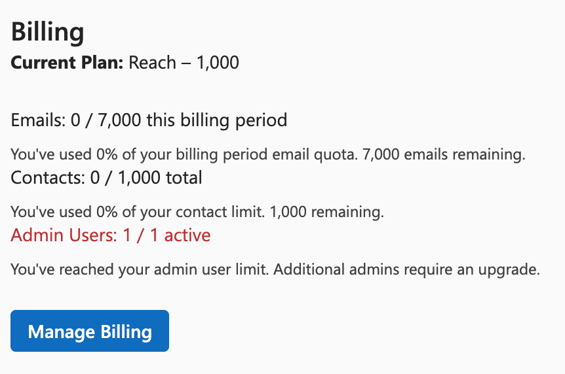
Reach Plans
Reach billing plans are designed for flexibility and growth as you increase engagement with your community. All subscription levels are contact-based (Ex: $19/month for up to 1,000 contacts) and have a fixed number of seats available. As you grow your list, you will automatically be upgraded to the next tier at your billing renewal date. You can always view your current contact total in your account settings.
Important note: if you import a list of new contacts which exceeds your current contact limit, Parthenon will notify you that you're exceeding your contact limit and will trigger a subscription upgrade at your next subscription renewal date.
Manage Billing
Payment Methods
If you need to update the payment method on file or make a change to your subscription, you may do so in Setting > Manage Billing. You will be redirected to our Stripe experience where you can:
-
Update your payment method
-
Upgrade your subscription
-
Cancel your subscription
Add-ons
Parthenon Labs offers paid add-ons like Text Messaging to supplement your current plan with additional features and functionality.
If you're not sure what plan or features you need, you can always contact our sales team!