
Subscription pages make it easy for people to sign themselves up to receive email and text message updates from your organization. These forms are designed to keep you compliant with email and SMS laws while giving constituents a simple, trustworthy way to opt in.
You can share a subscription page link anywhere or embed it directly on your website.
What is a subscription page?
A subscription page is a hosted signup form where someone can voluntarily provide their contact information and consent to receive messages from you.
Each form:
-
Is tied to a specific email list
-
Collects explicit opt-in consent
-
Automatically applies the correct legal disclosure
-
Works for email only, SMS only, or both
Once someone submits the form, they’re added to your list and can receive messages based on what they opted into.
What information does the form collect?
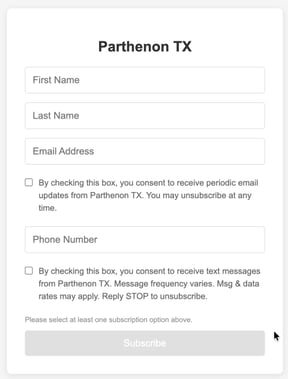
Your form may include:
-
First Name
-
Last Name
-
Email Address
-
Phone Number (optional, if SMS is enabled)
Email and phone number consent are handled separately, so subscribers stay in full control of how they hear from you.
Why email and SMS have separate checkboxes
Email and text messages are governed by different laws. That’s why the form requires separate consent for each channel.
This protects both you and the subscriber by ensuring:
-
Consent is clear and unabbiguous
-
Subscribers only receive the messages they asked for
-
Your communications remain compliant
Note: At this time, subscription pages are not customizable by individual users.
Sharing or embedding your form
You have two options for using a subscription page available in your account settings:
Share a link
Use the hosted form anywhere you'd like, including your website, social media, email signature, QR code, event check-ins, or printed materials.
Embed on your website
You can also embed the form directly into your website using the provided iframe code. This keeps the signup experience seamless while still using Parthenon’s infrastructure. You may need to work with your website manager to complete this process.
What Happens After Someone Subscribes?
Once submitted:
-
The contact is added to your account as a People record and added to your email and/or SMS opt-in segments.
-
Their email and/or SMS consent is recorded
-
They can unsubscribe at any time using built-in links or STOP commands
Subscription pages are one of the most effective ways to grow your audience. By using explicit opt-ins and standardized disclosures, you’re building trust with constituents while staying compliant with email and texting laws.