
Segments let you build dynamic groups of constituents based on information in your database. These groups automatically update as people’s data changes and can be reused across campaigns.
Think of segments as saved audiences that answer questions like:
-
“Who has opted into email?”
-
“Who lives in a specific city?”
-
“Who is tagged as a small business owner?”
-
“Who meets all of these criteria at once?”
How segment logic works
Segments use AND logic only. This means every person in the segment must meet all filters you define.
Example:
Email opt-in is true
AND Email Address is not blank
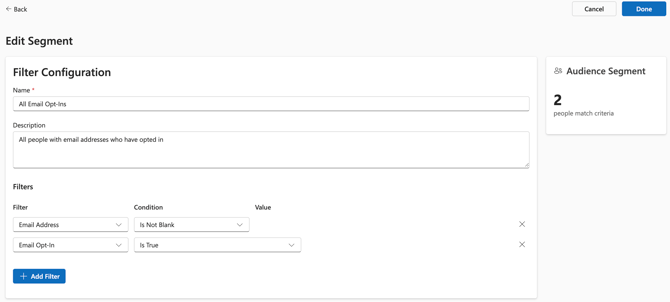
Only people who meet both conditions will be included. Segments are dynamic, so people will automatically enter or leave the segment as their information changes.
Building a segment
To create a segment, navigate to Audiences > Segments and:
-
Click New Segment
-
Enter a name and optional description
- Add one or more filters
- Click Done to save
The audience segment panel shows how many people currently match your criteria.
Available filter types
You can mix and match different types of filters in the same segment.
Personal information fields
These filters are used for fields like:
-
First Name
-
Last Name
-
Email Address
-
City
-
State
-
Zip Code
Available conditions include Is, Is Not, Contains, Starts With, Ends With, Is Blank, Is Not Blank.
Example:
Zip code is 78754
Email & SMS Opt-In Status
Use these filters to ensure compliance and target only people who have opted in.
Example:
Email opt-in is True
SMS opt-in is True
People Tags
People Tags support multi-value logic and are commonly used for interest or role-based targeting.
Available conditions include Has Any Of, Has All Of, Has None Of.
Example:
People Tags has any of Small Business, Event Attendee
Editing Segments
You can edit a segment at any time to:
-
Update its name or description
- Add or remove filters
Changes take effect immediately and update the audience size in real time.
Best practices
-
Use clear names so segments are easy to recognize later
-
Start broad, then layer in filters to refine your audience
-
Use opt-in filters when building email or SMS audiences
-
Reuse segments instead of rebuilding the same criteria repeatedly